Inbox on mobile
The mobile Inbox is the phone version of the desktop V28 Inbox — guest threads with AI draft approval.
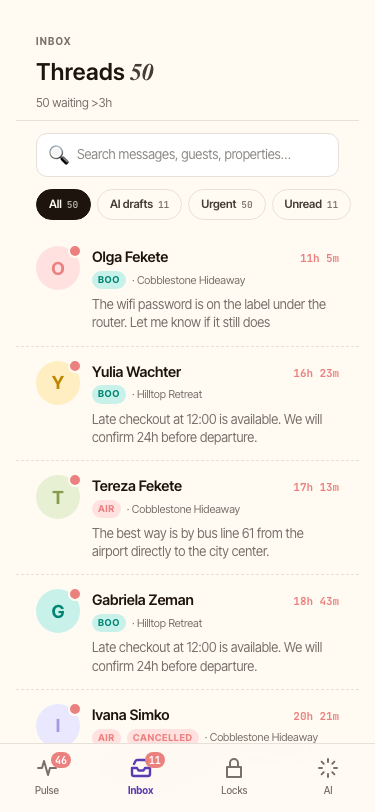
List view
The Inbox tab opens to a list of threads sorted by most-recent activity. Each row shows:
- Guest avatar + name
- Property slug (e.g.
Castle&River Vydrica) - Snippet of the most-recent message (translated if the original is not in your communication language)
- Time delta (e.g. "2h", "yesterday")
- Tag chips:
unanswered,early·requested,late·requested,cleaning,2N
The list is searchable via the search field at the top — searches across guest names + message content.
Detail view (the thread)
Tap a row to open the thread. The detail view shows:
- Header — guest name, property, dates, language picker.
- Reservation summary card — check-in / check-out times, # nights, total amount, status.
- Thread — messages in chronological order. Each guest message carries a date prefix (e.g. "Mon · 14:32") so you can tell a 20-day-old message from yesterday's at a glance.
- AI draft area — the AI-suggested reply, with two buttons:
- IMPROVE — keep the same language, refine the wording.
- REFINE — rewrite in your communication language.
Both buttons resolve outbound language via the same rule: the AI Suggest sees the same pickOutboundLanguage decision as the underlying send path.
- Composer — type to override the AI draft, or attach a file (📎,.
When you tap SEND, the system saves the AI's original draft into aiOriginalBody so the learning loop captures what you refined.
Language picker
The language picker in the thread header lets you override per-thread detection:
- Defaults to the auto-detected language (per Language detection rules).
- "Original" always appears as an option — pick it to write back in the guest's input language regardless of your communication language.
- Switching the picker persists the change and re-translates the existing thread on save.
Checked-out badge
A thread for a reservation that has already checked OUT shows a CHECKED OUT badge — but only after the actual checkout time has passed.